Technical Specification
Introduction
This document provides technical specifications for software developers at any Financial Institution or Third-Party vendor who are integrating custom content into their online and mobile applications with Candescent Digital Banking Products. Integration with Candescent Digital Banking's Federation Gateway Services requires that the partner adhere to SAML (Security Assertion Markup Language) SSO (single sign-on) standards.
This document describes the content integration options, as well as provides Candescent Digital Banking SAML assertion data and guidelines. This document does not supersede OASIS standards specifications. For more information about the SAML specification, please refer to www.oasis-open.org.
Integration Model
- Identity Provider (IdP): Candescent Digital Banking
- Service Provider (SP): Partner application or FI application
With respect to SSO SAML, Candescent Digital Banking is the Identity Provider (IdP) and the Partner is the Service Provider (SP). Consistent with the SAML specification, Candescent Digital Banking provides a unique and immutable (never changing) identity for the customer.
Audience Types
This specification supports two integration audiences:
| Audience | Description | Configuration |
|---|---|---|
| Financial Institution (FI) | Direct integration for a single institution | Single FI configuration |
| Marketplace Partner | Fintech serving multiple FIs | Static endpoint URL and certificate across all FIs |
Multi-FI Partner Integration
Marketplace Partners who offer SAML SSO to multiple Financial Institutions must use static configuration:
For multi-FI vendors, the endpoint URL and encryption certificate must remain static across all FI implementations. This enables Candescent to scale the connection efficiently.
Partner Configuration Requirements
| Requirement | Description |
|---|---|
| Static Endpoint URL | Same Assertion Consumer Service URL for all FIs |
| Static Certificate | Same encryption certificate for all FIs |
| FI Identification | Use FI_ID attribute in SAML assertion to identify the originating institution |
SAML 2.0 IdP-Initiated Web Browser SSO Flow
Candescent Digital Banking uses the SAML 2.0 IdP-Initiated Web Browser SSO Profile with POST binding.
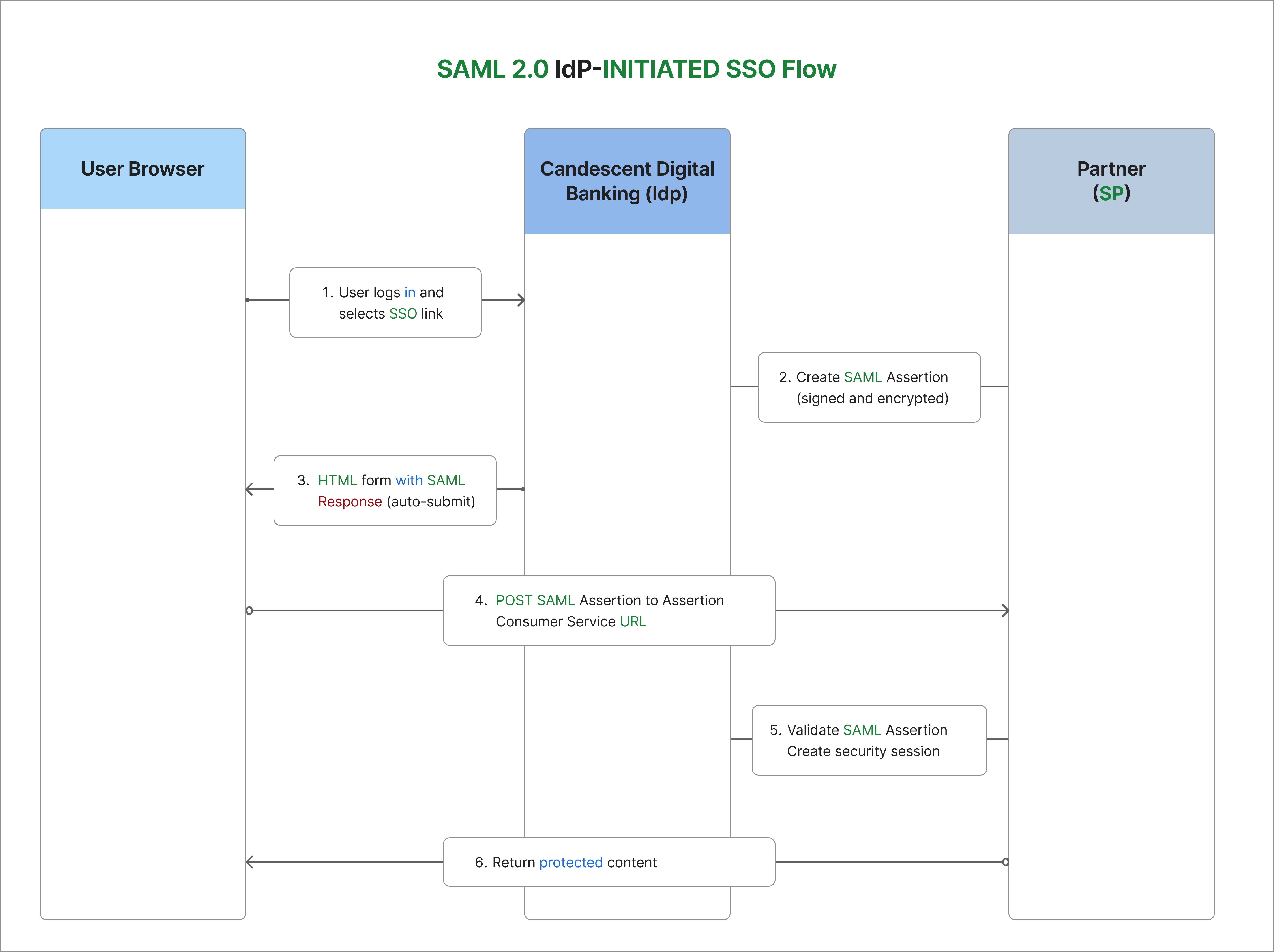
Flow Description
| Step | Description |
|---|---|
| Step 1 | User logs in to Candescent Digital Banking and selects an SSO navigation item |
| Step 2 | Candescent creates a SAML Assertion containing user identity and attributes |
| Step 3 | Browser receives HTML form with Base64-encoded SAML Response |
| Step 4 | Browser POSTs SAML Assertion to Partner's Assertion Consumer Service URL |
| Step 5 | Partner validates signature, decrypts assertion, and creates security session |
| Step 6 | Partner returns protected content to user |
SSO Profile Details
| Property | Value |
|---|---|
| Federation Type | Web Application |
| Flow Direction | Outbound from Candescent Digital Banking |
| IdP | Candescent Digital Banking |
| SP | FI or Third-Party Partner |
| SAML Profile | IdP-Initiated Web Browser SSO |
| Binding | HTTP POST |
| SAML Version | 2.0 |
Security Requirements
The following requirements are consistent with the SAML specification and ensure full security during the SSO:
| Requirement | Description |
|---|---|
| Assertion Encryption | SAML assertions must be encrypted to protect PII data in the browser |
| Assertion Signing | SAML assertions must be signed for integrity verification |
| Transport Security | All network traffic must use TLS 1.2+ |
| Certificate Authority | Production environments require certificates from trusted CAs. Self-signed certificates may be used in staging/test environments |
Supported Security Algorithms
Digital Signature Algorithms
| Algorithm | Status |
|---|---|
| RSA SHA256 | ✅ Recommended |
| RSA SHA384 | Supported |
| RSA SHA512 | Supported |
| RSA SHA1 | Supported (legacy) |
Encryption Algorithms
| Algorithm | Status |
|---|---|
| AES-128 | ✅ Recommended |
| AES-256 | Supported |
| Triple DES | Supported (legacy) |
Integration Checklist
Partner Provides to Candescent
| Item | Description |
|---|---|
| Assertion Consumer Service URL | POST URL for receiving SAML assertions (must support HTTPS on port 443) |
| X509 Certificate (PEM format) | From trusted CA for production; self-signed acceptable for test |
| Service Provider Entity ID | Unique identifier for your application |
Candescent Provides to Partner
| Item | Description |
|---|---|
| Federation Registration Metadata | Optional metadata file |
| X509 Certificate | Public key for verifying SAML assertion signatures |
| Identity Provider Entity ID | Candescent's IdP identifier |
System Requirements
| Requirement | Description |
|---|---|
| Time Synchronization | System time must be accurate (NTP synchronized) for timestamp validation |
| HTTPS Support | Port 443 with valid TLS certificate |
| SAML Processing | Ability to decrypt and validate SAML assertions |
Data Exchange
SAML Assertion Attributes
The fields below are included as attributes in the SAML assertion. The entire assertion (all attributes as one block) is encrypted.
| Field Name | Type | Description |
|---|---|---|
FI_ID | Alphanumeric | Internal ID for the subject Financial Institution |
USER_ID | Alphanumeric | ID of the subject user on the FI's host processing system |
USER_ACCOUNTS | XML Document | List of accounts and associated nicknames for the user |
KEEP_ALIVE_URL | URL | URL to keep the Online Banking session alive |
XML_DATA | XML Document | Optional. Custom data structure determined during integration |
SESSION_ID | Alphanumeric | Optional. Online Banking session ID for the logged-in user |
USER_ACCOUNTS XML Structure
Below is a sample output of the USER_ACCOUNTS XML:
<ns7:accounts xmlns="http://schema.intuit.com/domain/banking/financialInfo/v2"
              xmlns:ns7="http://schema.intuit.com/domain/banking/account/v2"
              xmlns:xsi="http://www.w3.org/2001/XMLSchema-instance">

  <ns7:account xsi:type="ns7:DepositAccount">
    <ns7:id>vWlYcq3tIA3-BtsryKXRxVfcOd5tt9V152FCw7Gf5eg</ns7:id>
    <ns7:nickname>Checking</ns7:nickname>
    <ns7:accountnumber>
      <ns7:hostvalue>XXX4444</ns7:hostvalue>
      <ns7:displayvalue>XXX4444</ns7:displayvalue>
      <ns7:billpayvalue>0XXX4444</ns7:billpayvalue>
      <ns7:pfmvalue>XXX4444</ns7:pfmvalue>
      <ns7:rdcaccountvalue>XXX4444</ns7:rdcaccountvalue>
      <ns7:rawhostvalue>XXX4444</ns7:rawhostvalue>
    </ns7:accountnumber>
  </ns7:account>

  <ns7:account xsi:type="ns7:DepositAccount">
    <ns7:id>MShR_xxIzZZ8lz3RF01iBJBSLWyd7cGzD97rn2ka5M</ns7:id>
    <ns7:nickname>Savings Account</ns7:nickname>
    <ns7:accountnumber>
      <ns7:hostvalue>XXX5555</ns7:hostvalue>
      <ns7:displayvalue>XXX5555</ns7:displayvalue>
      <ns7:billpayvalue>0XXX5555</ns7:billpayvalue>
      <ns7:pfmvalue>XXX5555</ns7:pfmvalue>
      <ns7:rdcaccountvalue>XXX5555</ns7:rdcaccountvalue>
      <ns7:rawhostvalue>XXX5555</ns7:rawhostvalue>
    </ns7:accountnumber>
  </ns7:account>

</ns7:accounts>
The XSD describing the USER_ACCOUNTS output can be provided by your Integration PM on request.
Session Management
Keep-Alive Implementation
The Candescent Digital Banking platform supports keep-alive messages from the third-party app through use of the KEEP_ALIVE_URL provided as a SAML attribute.
The keep-alive URL needs to be called from the client side (within the browser) to keep the Online Banking session active while activity is occurring in the third-party application.
JavaScript Implementation Example
<script>
  // Extract KEEP_ALIVE_URL from SAML assertion attributes
  var keepAliveUrl = "{KEEP_ALIVE_URL from SAML assertion}";

  // Call keep-alive every 5 minutes (300000 ms)
  var keepAliveInterval = 300000;

  function sendKeepAlive() {
    var img = new Image();
    img.src = keepAliveUrl + "?t=" + new Date().getTime();
  }

  // Start keep-alive timer
  setInterval(sendKeepAlive, keepAliveInterval);

  // Also send keep-alive on user activity
  document.addEventListener('click', function() {
    sendKeepAlive();
  });
</script>
Session ID Usage
The optional SESSION_ID attribute can be used to:
- Tie activity in the third-party app to activity recorded by Online Banking
- Correlate logs and audit trails across systems
- Debug session-related issues
Mobile App Compatibility
Once a successful SSO connection is established, the vendor application and content will be displayed in the Candescent mobile application using the native device WebView.
The WebView is a system component provided by the device OS (iOS/Android), not a resource developed or owned by Candescent. All vendors who want to offer their application in Candescent's mobile app must ensure their content is compatible with the WebView.
WebView Requirements
| Platform | Documentation |
|---|---|
| iOS | Apple WKWebView Documentation |
| Android | Android WebView Documentation |
Vendors should reference the publicly available documentation from Apple and Google on coding for their respective WebViews.
Python Implementation Example
A complete Flask implementation for a SAML Service Provider:
import json
from flask import Flask, request, redirect, session, make_response
from onelogin.saml2.auth import OneLogin_Saml2_Auth
from onelogin.saml2.utils import OneLogin_Saml2_Utils
import secrets

app = Flask(__name__)
app.secret_key = secrets.token_hex(32)

def init_saml_auth(req):
    """Initialize SAML auth object with request data."""
    auth = OneLogin_Saml2_Auth(req, custom_base_path="saml/")
    return auth

def prepare_flask_request(request):
    """Prepare Flask request for python3-saml."""
    return {
        'https': 'on' if request.scheme == 'https' else 'off',
        'http_host': request.host,
        'script_name': request.path,
        'get_data': request.args.copy(),
        'post_data': request.form.copy()
    }

@app.route('/saml/acs', methods=['POST'])
def saml_acs():
    """
    Assertion Consumer Service (ACS) endpoint.
    Receives and processes SAML assertions from Candescent.
    """
    req = prepare_flask_request(request)
    auth = init_saml_auth(req)

    # Process the SAML response
    auth.process_response()
    errors = auth.get_errors()

    if errors:
        return f"SAML Error: {', '.join(errors)}", 400

    if not auth.is_authenticated():
        return "Authentication failed", 401

    # Extract SAML attributes
    attributes = auth.get_attributes()
    name_id = auth.get_nameid()

    # Store user info in session
    session['saml_user'] = {
        'name_id': name_id,
        'fi_id': attributes.get('FI_ID', [None])[0],
        'user_id': attributes.get('USER_ID', [None])[0],
        'session_id': attributes.get('SESSION_ID', [None])[0],
        'keep_alive_url': attributes.get('KEEP_ALIVE_URL', [None])[0],
        'user_accounts': attributes.get('USER_ACCOUNTS', [None])[0],
    }

    # Redirect to application
    return redirect('/dashboard')

@app.route('/dashboard')
def dashboard():
    """Protected dashboard page."""
    if 'saml_user' not in session:
        return "Not authenticated", 401

    user = session['saml_user']
    return f"""
    <html>
    <head>
        <title>Dashboard</title>
        <script>
            // Keep-alive implementation
            var keepAliveUrl = "{user.get('keep_alive_url', '')}";
            if (keepAliveUrl) {{
                setInterval(function() {{
                    var img = new Image();
                    img.src = keepAliveUrl + "?t=" + new Date().getTime();
                }}, 300000);
            }}
        </script>
    </head>
    <body>
        <h1>Welcome!</h1>
        <p>User ID: {user.get('user_id')}</p>
        <p>FI ID: {user.get('fi_id')}</p>
    </body>
    </html>
    """

@app.route('/saml/metadata')
def saml_metadata():
    """Return SP metadata for Candescent configuration."""
    req = prepare_flask_request(request)
    auth = init_saml_auth(req)

    settings = auth.get_settings()
    metadata = settings.get_sp_metadata()
    errors = settings.validate_metadata(metadata)

    if errors:
        return f"Metadata Error: {', '.join(errors)}", 400

    resp = make_response(metadata, 200)
    resp.headers['Content-Type'] = 'application/xml'
    return resp

if __name__ == '__main__':
    app.run(ssl_context='adhoc', debug=True)
SAML Settings File (saml/settings.json)
{
  "strict": true,
  "debug": false,
  "sp": {
    "entityId": "https://yourapp.com/saml/metadata",
    "assertionConsumerService": {
      "url": "https://yourapp.com/saml/acs",
      "binding": "urn:oasis:names:tc:SAML:2.0:bindings:HTTP-POST"
    },
    "x509cert": "YOUR_SP_CERTIFICATE",
    "privateKey": "YOUR_SP_PRIVATE_KEY"
  },
  "idp": {
    "entityId": "CANDESCENT_IDP_ENTITY_ID",
    "singleSignOnService": {
      "url": "",
      "binding": "urn:oasis:names:tc:SAML:2.0:bindings:HTTP-POST"
    },
    "x509cert": "CANDESCENT_IDP_CERTIFICATE"
  },
  "security": {
    "nameIdEncrypted": false,
    "authnRequestsSigned": false,
    "logoutRequestSigned": false,
    "logoutResponseSigned": false,
    "signMetadata": false,
    "wantMessagesSigned": true,
    "wantAssertionsSigned": true,
    "wantAssertionsEncrypted": true,
    "wantNameIdEncrypted": false,
    "signatureAlgorithm": "http://www.w3.org/2001/04/xmldsig-more#rsa-sha256",
    "digestAlgorithm": "http://www.w3.org/2001/04/xmlenc#sha256"
  }
}
Required packages:
pip install flask python3-saml
Troubleshooting
Common Issues
| Issue | Possible Cause | Solution |
|---|---|---|
| Signature validation failed | Certificate mismatch or expired | Verify you're using the correct Candescent certificate |
| Decryption failed | Wrong private key or algorithm mismatch | Check encryption algorithm and certificate configuration |
| Assertion expired | Clock skew between systems | Ensure NTP time synchronization |
| Invalid Assertion Consumer URL | URL mismatch | Ensure exact URL match including protocol and path |
| Session timeout | Keep-alive not implemented | Implement keep-alive calls using provided URL |
Debugging Tips
- Enable SAML debug logging in your SP library
- Decode the SAML Response (Base64) to inspect the raw XML
- Check system clocks on both IdP and SP systems
- Validate certificates haven't expired
- Review browser network tab for POST data and redirects
SAML Resources
| Resource | URL |
|---|---|
| Wikipedia - SAML 2.0 | https://en.wikipedia.org/wiki/SAML_2.0 |
| OASIS SAML V2.0 Executive Overview | https://www.oasis-open.org/committees/security/ |
| OASIS SAML V2.0 Technical Overview | https://docs.oasis-open.org/security/saml/Post2.0/sstc-saml-tech-overview-2.0.html |
Recommended SAML Libraries
Building a SAML gateway from scratch can be complex. We highly recommend using established libraries:
| Language | Library |
|---|---|
| Python | python3-saml |
| Java | OpenSAML |
| PHP | SimpleSAMLphp |
| C | ZXID |
| Node.js | saml2-js or passport-saml |
| .NET | Sustainsys.Saml2 |
Commercial solutions like PingIdentity, Okta, Oracle, or Microsoft ADFS are also excellent options.
Support
For questions or support, contact your assigned Candescent Integration PM. Your PM will provide:
- Federation Registration metadata
- X509 Certificate for signature verification
- Identity Provider Entity ID
- Test environment access
- XSD schemas for XML data structures